Ask Claude for Your AI Visibility Data — Introducing the Visible MCP Server
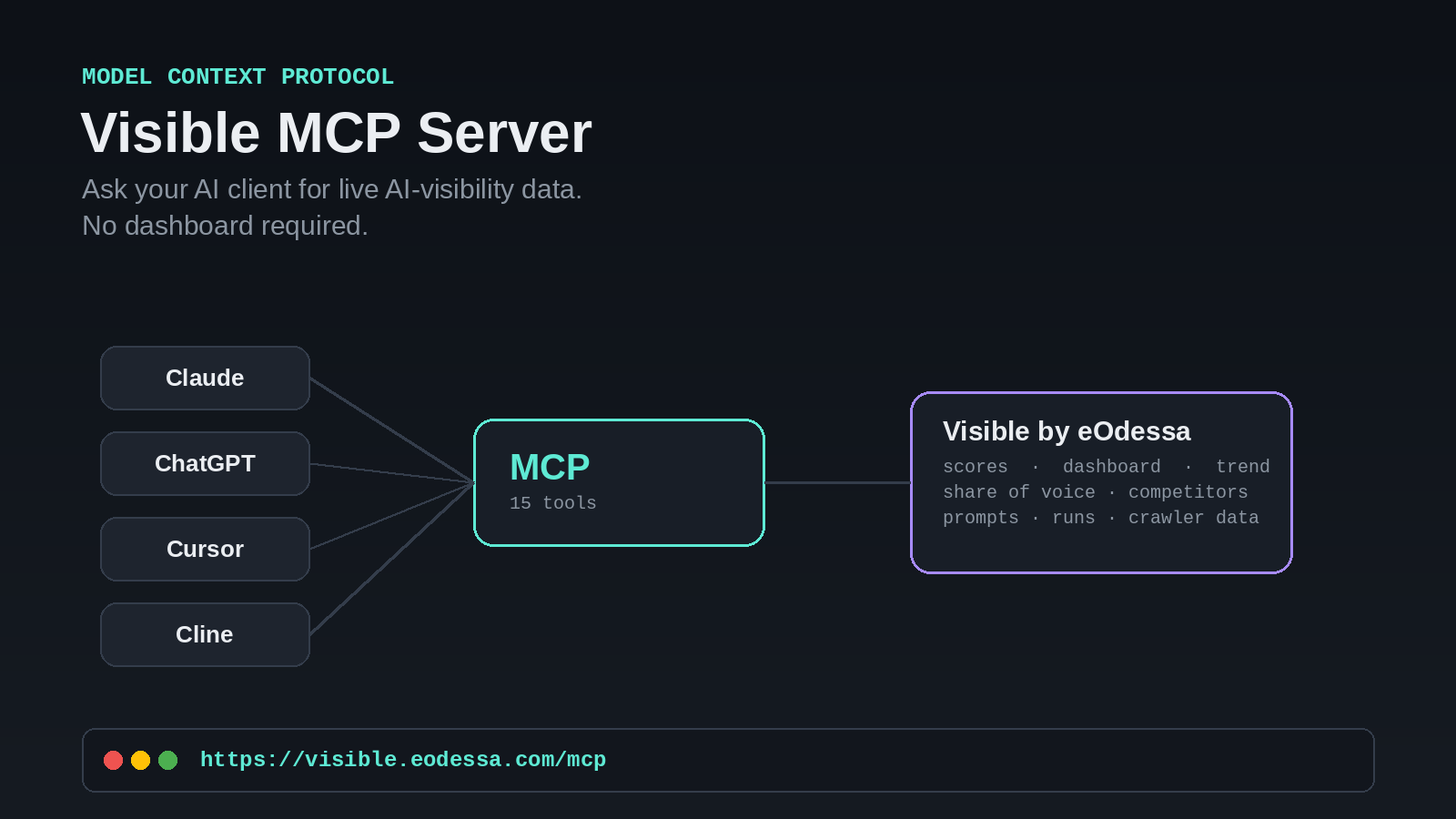
Visible by eOdessa now has a remote MCP server at https://visible.eodessa.com/mcp. Connect any Model Context Protocol–compatible AI client — Claude.ai, Claude Desktop, Claude mobile, ChatGPT, Cursor, or Cline — and ask for your AI-visibility score, share of voice, or competitor trend directly in chat, sourced live from your account. No dashboard tab required. It's available today on Pro and Enterprise plans, across claude.ai, Claude Desktop, and mobile.
What is Visible MCP
Visible MCP is a hosted Model Context Protocol server — an open standard for connecting AI applications to external systems. Instead of building a custom integration to pull your AI-visibility data into an AI tool, you point your MCP client at Visible's server and let it call tools directly against your account.
In practice, that means your Visible data becomes available inside the AI tool you already use every day, without a separate login or a separate app.
Why this matters for how you actually check visibility
Mechanism, not marketing: most AI-visibility workflows still end at a dashboard — you check a score, then leave the tool you were working in to go look it up. MCP removes that hop. The AI client you're already talking to becomes the interface to your data, because it can call Visible's tools mid-conversation instead of routing you to a separate page.
This also closes a small but real loop: Visible exists to track how your brand shows up when people ask AI tools questions. Now the same category of tool — an AI chat client — is how you check that tracking, instead of a static report you have to remember to go open.
Bound the claim: Visible MCP doesn't change your visibility score or how AI engines cite you — it changes how you access the data Visible already collects. The underlying methodology (sampling across ChatGPT, Claude, Copilot, Gemini, Google AI Overview, and Perplexity) is unchanged; MCP is a new, read-only access path to the same numbers you'd see on the dashboard.
What you can ask it
The server exposes 15 tools covering the same data your Visible dashboard shows:
- Health check — confirm the connection and your key are working
- Visibility scores — your brand's current AI-visibility score
- Dashboard / overview — mention rate, citation rate, cited-sources count, share of voice, and score trend in one call
- Trend — how your score and mentions are moving over time, brand vs. competitors
- Share of voice — your brand's share of AI-answer mentions relative to named competitors
- Brands — list every brand profile on the account
- Prompts (tracked topics) and their runs — which prompts you're tracking and what each run returned
- Competitors — who's tracked against your brand
- Runs — list and detail — individual AI-response runs, including sentiment and citations
- Competitor comparison — trend and share-of-voice data combined into one competitive view
- Docs search — searchable help content, answered in-chat
- Raw response — the original stored AI answer behind any run
- Crawler / agent analytics — which AI bots (GPTBot, ClaudeBot, PerplexityBot, and others) are actually crawling your site
Here's what a real query looks like, end to end:
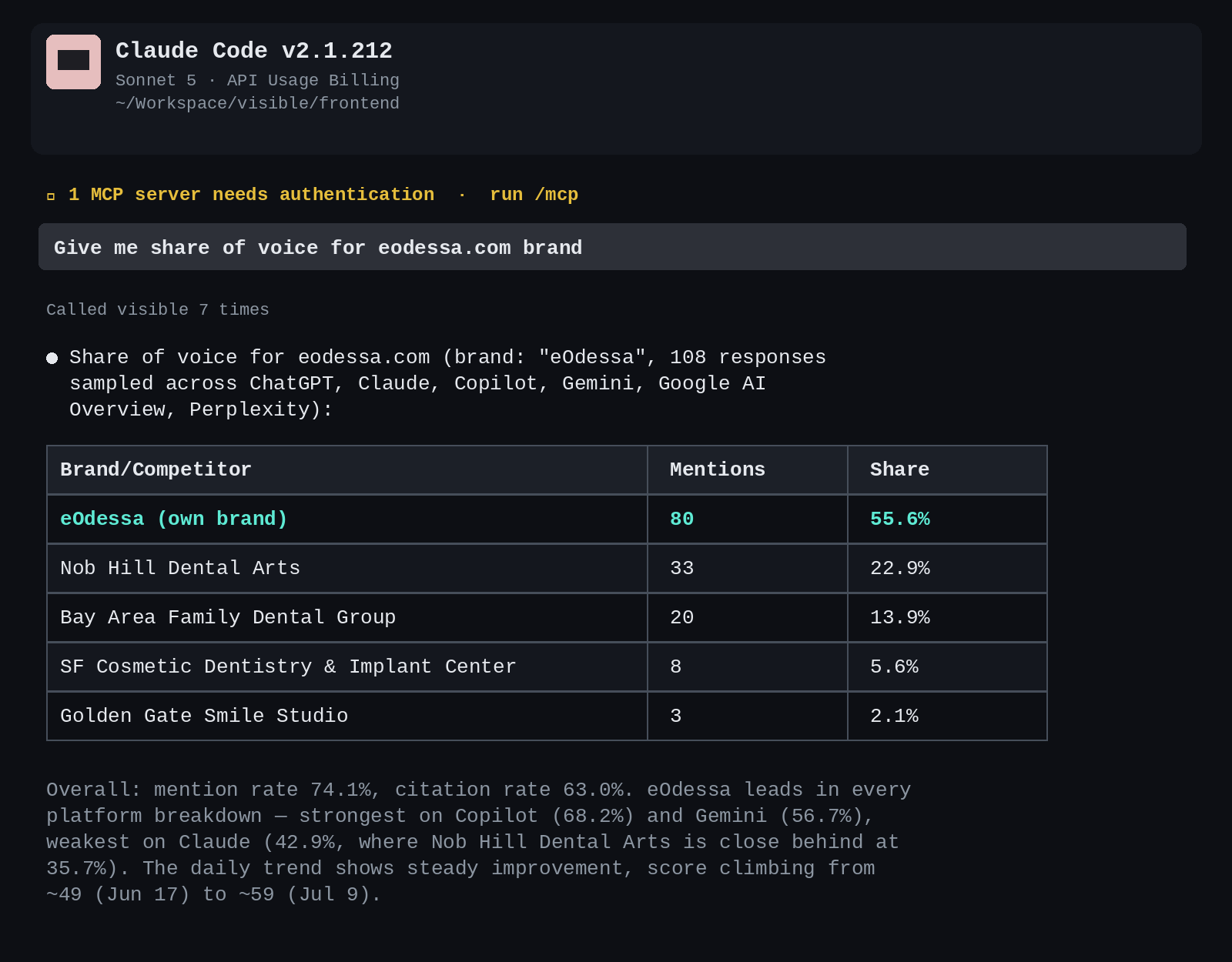
A single prompt — "Give me share of voice for eodessa.com brand" — returns a full competitor breakdown, the overall mention and citation rate, a per-platform strongest/weakest read, and the trend direction, all sourced live from the account's Visible data.
Hosted server or self-hosted package: two ways to connect
Both options are thin wrappers over the same public REST API — no business logic lives in either layer. Pick based on whether you want Visible to run the process, or you do.
visible.eodessa.com/mcp
Point your MCP client at the hosted URL with your API key. Nothing to run or maintain — this is the fastest path for most teams and what the config snippet in Settings generates by default.
@eodessa/visible-mcp
A local package you run yourself, calling the same public REST API directly with your own key. Built for privacy-conscious or enterprise setups that want the process on their own infrastructure.
How to connect an MCP client
- Generate an API key. In Visible, go to Settings → API Keys and generate a new key. The reveal-once dialog gives you a ready-to-paste config snippet with the key already filled in.
- Add the config to your MCP client. Paste the JSON block below into your client's config — the same shape whether you're using Claude Desktop, Cursor, or Cline.
- Reconnect and ask. Visible's tools will appear in your client, and you're ready to ask questions.
{
  "mcpServers": {
    "visible": {
      "type": "http",
      "url": "https://visible.eodessa.com/mcp",
      "headers": { "Authorization": "Bearer <the generated key>" }
    }
  }
}
Key takeaway
Visible MCP puts your AI-visibility data one question away, inside the AI client you already use — 15 read-only tools, connected in two steps, available hosted or self-run.
Where this stands today
The build is functionally complete: all 15 tools are live, reachable both as the hosted server above and as the self-run package, and verified end-to-end against real account data — including authentication, scoping, and cross-tenant isolation checks. The only pieces still pending are the kind of one-way, credentialed actions that get run by hand rather than from an automated pipeline: the final production image push and the public npm publish of the local package. Everything short of that is built, tested, and ready.
Frequently asked questions
What is Visible MCP?
Visible MCP is a hosted Model Context Protocol server at https://visible.eodessa.com/mcp that lets AI clients query your Visible by eOdessa AI-visibility data — scores, dashboard, trend, share of voice, competitors, and more — directly from a chat interface.
Which AI tools work with Visible MCP?
Any MCP-compatible client: Claude.ai, Claude Desktop, Claude mobile, ChatGPT, Cursor, Cline, and other MCP-compatible agents and coding tools.
Which plans include Visible MCP?
Pro and Enterprise plans include MCP access today, across claude.ai, Claude Desktop, and mobile.
Is Visible MCP read-only?
Yes, for v1. Generated keys default to read-only scope, and the current tool set only reads data — there are no write or create actions exposed yet.
Do I need to build anything to use it?
No. Generate an API key from Settings → API Keys, paste the provided config snippet into your MCP client, and reconnect. No custom integration code required.
Can I self-host the MCP server instead of using the hosted one?
Yes — @eodessa/visible-mcp is a local package you run yourself, pointed at the same public REST API with your own key.
Connect your AI client to Visible
Generate a key from Settings → API Keys and start asking for your AI-visibility data directly in chat.
Get your MCP key →