Deep Scan in Action: Watch Your Website Get Mapped, Scored and Fixed for AI Search
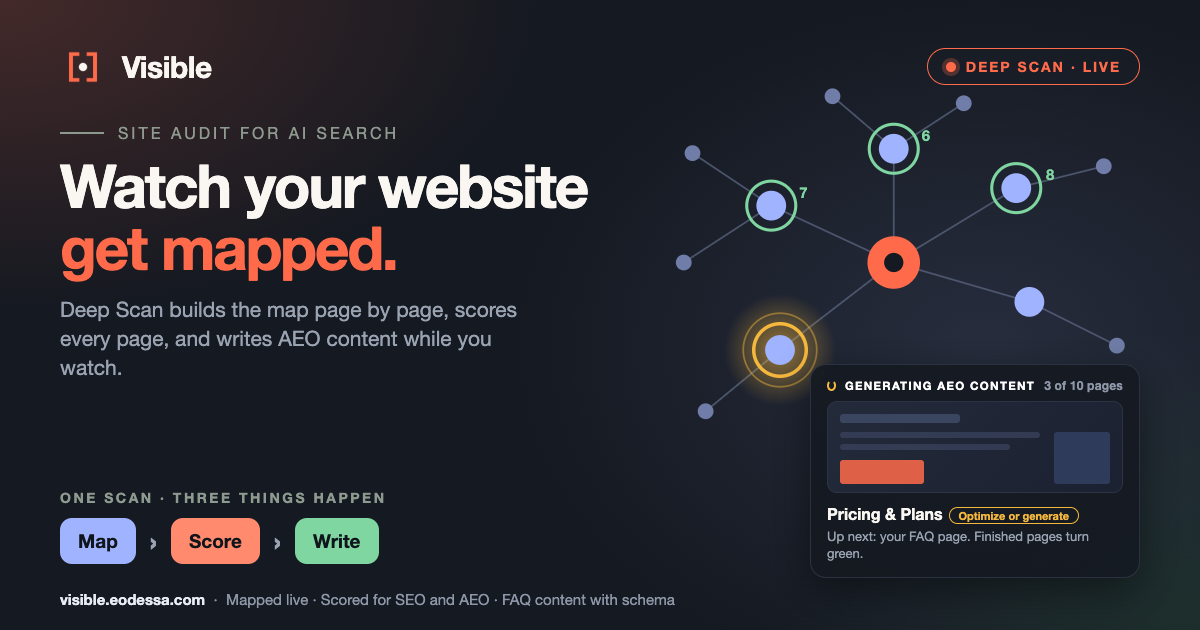
Deep Scan is Visible's SEO and AEO site audit, and as of this release you can watch it work. Your site map builds page by page while the crawler runs, every new page appears with a thumbnail, and while Visible writes AEO content for your most important pages, the page it is working on glows amber. Here is what you see, what it means, and what to do with the result.
Think about the last website audit you ran. A tool crawled your site somewhere out of sight. Days later a report arrived with some pages marked weak and a few things marked critical. What you never saw was the crawl itself: which pages it found, which it skipped, what it actually looked at. An audit you cannot see is an audit you have to take on trust. We built one you can watch.
What is Deep Scan?
Deep Scan crawls your website the way a browser does, follows your internal links, and builds a complete model of the site, a digital twin. It then scores every page for SEO (can search engines find and rank you?) and for AEO, answer engine optimization (can AI assistants such as ChatGPT, Claude, Gemini and Perplexity extract your facts and cite you?). The two are different problems, which is why AEO and SEO need separate checks.
What is new: the scan no longer happens out of sight. The map, the page count, the elapsed time and the AEO content being written are all visible while the scan runs.
What do you see while a Deep Scan runs?
Open the scan's page and five things start moving at once:
| What you see | What it tells you |
|---|---|
| Pages discovered, "of up to" your limit | How far the crawl is toward your plan's page limit, with a progress bar and how long the scan has been running. The count flashes each time it goes up. |
| The Coverage Map, growing | Your home page first, then the pages it links to, each connected to the page it was found from. You watch the structure of your site appear, level by level. |
| A thumbnail for every new page | Each page shows up in the bottom-left corner with its picture and title, so you see what the crawler sees, including pages you forgot you had. |
| A rolling log on the title line | One message at a time describing what is happening right now. The full time-stamped history stays in the Activity Log at the bottom of the page. |
| Depth Legend and map controls | Pages are colored by how many clicks they are from your home page. You can pause, switch between 2D and 3D, show labels, or go full screen. |
The surprises come early. An old campaign page, a section you thought was retired, a page buried many clicks deep: they appear on the map while the crawl is still running, not weeks later in a spreadsheet.
How does Deep Scan write AEO content?
Turn on Build FAQ when you create a scan and, once the crawl is done, Visible works through your most important pages one at a time, up to the number you set. For each page it researches the questions people actually ask, writes clear, direct answers, and produces FAQ schema markup: structured data that tells search engines and AI assistants exactly which text is a question and which is its answer.
You can watch every step on the map. A card titled Generating AEO content shows the page's thumbnail, the stage it is at and a counter such as "3 of 10 pages". Between pages it tells you which page is up next and why it was picked, for example your home page or a page with an FAQ problem. The rings tell the rest of the story:
- Amber, pulsing: Visible is writing content for this page right now.
- Green: the page is finished. Zoom in to see how many FAQs were written for it.
- Red: this one page could not be completed. The scan carries on with the rest.
You stay in control of what is published. Deep Scan produces recommendations; it does not change your website. As with any content, read the wording and check it against your own facts before it goes on a page.
What do you get when it finishes?
The results are organized in tabs, each answering a different question:
- Content Quality: templated pages, pages thin on facts, and schema opportunities.
- SEO / AEO: an SEO Score, an AEO Score and a Differentiation Score for every page, with page-level recommendations.
- AEO Gaps: site-wide problems grouped by severity, with how many pages each one affects.
- Suggested Prompts: questions your customers might ask, which you can import into Visible with one button to start tracking them.
- Deep Crawl Recommendations: ranked fixes from twelve separate analyses of everything the crawler found.
- PDF report: a polished audit you can share.
How long does a Deep Scan take?
It depends on the size of your site, the limits you set and how quickly your pages respond. To give a sense of scale: in one of our own test scans of a site with a few hundred pages, mapping took a little over half an hour, and writing AEO content for ten pages took about twelve minutes after that. Your times will differ. You do not have to wait: the scan keeps running on Visible's side, and when you come back the map shows everything found so far.
How many pages can a Deep Scan cover on each plan?
| Plan | Deep Scans per month | Pages per scan |
|---|---|---|
| Free | 1 | Up to 6 |
| Basic | 2 | Up to 50 |
| Pro | 5 | Up to 250 |
The Max Pages and Max Depth sliders start at your plan's maximum, and you can lower them. A good first run on any plan is your home page plus a modest page limit: watch what the map shows you before you scale up.
A simple routine to turn a scan into results
- Run a Deep Scan. Start a scan with SEO and AEO analysis on, and turn on Build FAQ for your most important pages.
- Fix the biggest gaps. Handle the critical items first, then the AEO Gaps that affect many pages at once.
- Review and publish the AEO content. Check the FAQ content against your own facts, then add it to your pages.
- Import the suggested prompts. Add the Suggested Prompts to Visible so you track the questions your content should answer.
- Check your visibility again. Watch your AI Search Visibility Score and citation rate to confirm the changes landed.
Key takeaway
Your visibility results tell you how AI talks about you. A Deep Scan tells you what to change on your own website, and now you can watch it map, score and write while it happens, instead of waiting for a report you have to take on trust.
Deep Scan is the "diagnose" step of Visible's loop: diagnose with Deep Scan, fix with FAQ Builder and Content Agent, then measure your AI Search Visibility Score to confirm the change landed.
Frequently asked questions
What is Deep Scan?
Deep Scan is Visible's SEO and AEO site audit. It crawls your website the way a browser does, builds a model of it (a digital twin), scores every page for SEO and for AEO (answer engine optimization), and ranks what to fix first. It can also write FAQ content with schema markup for your most important pages.
Can I watch a Deep Scan while it runs?
Yes. The Coverage Map builds page by page while the crawler works, each new page appears with its thumbnail and title, and the Configuration section shows how many pages have been found out of your plan's limit, plus how long the scan has been running. When AEO content is being written, the page in progress is highlighted on the map.
What do the amber, green and red rings on the Coverage Map mean?
An amber, pulsing ring marks the page Visible is writing AEO content for right now. A green ring means the page is finished, and zooming in shows how many FAQs were written for it. A red ring means that one page could not be completed; the scan carries on with the rest.
What is AEO content, and does Deep Scan publish it for me?
AEO content is content shaped so AI assistants can extract and cite it: real questions, clear direct answers and FAQ schema markup. Deep Scan produces it as recommendations. It does not change your website, so you review the wording against your own facts and then add it to your pages.
Do I have to keep the page open during a scan?
No. The scan runs on Visible's side. If you leave and come back, the map shows everything found so far, and the Activity Log at the bottom of the page keeps the full, time-stamped history.
How many pages can a Deep Scan cover on my plan?
The Free plan includes 1 Deep Scan a month of up to 6 pages, Basic includes 2 scans a month of up to 50 pages, and Pro includes 5 scans a month of up to 250 pages. Max Pages and Max Depth sliders start at your plan's maximum and you can lower them.
Watch a Deep Scan of your own site
See your pages appear on the map, then your SEO and AEO gaps, and your AI Search Visibility Score across ChatGPT, Claude, Gemini, Perplexity, Google AI Overview, and Copilot. Free to start, no credit card.
Start your free scan →